🧑💻 Join our Free Info Session to learn what PeerSphere can do for you!
Join our Free Info Session to learn what PeerSphere can do for you!


Table of Contents
Members Zoom FAQs for Live Sessions
We want everyone to have a great experience in our live sessions. If you are experiencing any difficulties with Zoom, please see the FAQs below to help you find a solution:
Support contact details:
- If you cannot access the live session, please email help@peer-sphere.com which our technical assistants will be monitoring closely.
- If you have joined the call but are having issues with things like audio or screen settings, you can send a chat message to the PeerSphere account that provides technical assistance for the call.
5 Things to do before joining the call:
- Sign-in to your zoom account before you join the call
- We recommend you join the call from your computer/laptop
- If you are accessing the call from the Zoom app, make sure your app is up to date.
- If you are accessing the call from your browser, Zoom works best on these browsers: : Google Chrome, Mozilla Firefox, and Chromium Edge (Microsoft edge). Make sure that your browser is up to date. Zoom officially supports the 2 most recent versions of these browsers.
- Check your device’s operating system meets Zoom’s OS requirements and processor requirements (click the links to learn more about them).
Using the Zoom app versus the web browser
- Zoom recommends using its app where possible, because it has the best performance and stability.
- However, we know that accessing the app can be hard for some of our members in China, in which case you can join using the web browser.
- For all users, you may also find that depending on your set up, issues can be resolved by swapping from using the desktop app to the web browser and vice versa.
Unable to join the call:
Quick steps:
- Check your Zoom app is up to date.
- If you are using a browser, check it is a recommended one (Chrome / Mozilla / Edge), and check it is within 2 versions of the current version.
- Restart your device and try again.
Zoom connection Timed Out (Error Code 13215)
Zoom sometimes gives the error message 13215 when users are unable to join. Based on our experiences, it is likely that this issue is caused by your Wi-Fi network, or because Zoom is preventing access from free zoom accounts in your area.
Issues during the call:
Latest guidance for Error Code 13215
Please try each of the following steps to see if it resolves the problem:
- If possible, log in to a paid Zoom account (e.g. Zoom Pro) before joining the call
- Hot spot from a 4/5G network, or join from your phone
- Change to a different wifi network
- If you have a way of accessing an international network, try using it. If it was already on, try using a different sever
- If these steps do not work, email help@peer-sphere.com with the subject ‘Zoom Timeout Fix’
Remember, you can chat message the PeerSphere account in the call for assistance!
Audio issues:
- Try leaving and rejoining the call.
- Clear cache and cookies from the settings.
- Restart your browser or device.
- See more zoom audio troubleshooting tips here.
- If you are on a windows device which uses realtek, there is a known audio issue. Zoom has provided troubleshooting steps for this here.
Video issues:
- Video functionality may be limited by your internet bandwidth – you can see more information here.
- You can try a different network or device.
- If many users from your school are joining sessions at the same time, joining a different network or building can help ease bandwidth congestion.
Extra Information:
Zoom’s operating system requirements
Desktop operating systems
- macOS X with macOS X (10.10) or later
- Windows 11
- Windows 10
- Windows 8 or 8.1
- Windows 7
- ChromeOS
- Ubuntu 12.04 or higher
- Mint 17.1 or higher
- Red Hat Enterprise Linux 6.4 or higher
- Oracle Linux 6.4 or higher
- CentOS 6.4 or higher
- Fedora 21 or higher
- OpenSUSE 13.2 or higher
- ArchLinux (64-bit only)
Mobile operating systems
- iOS 8.0* or later
- iPhone 4 or later, iPad Pro, iPad Mini, iPad 2 or later, iPod touch 4th Generation, iPhone 3GS (no front facing camera)
- iPadOS 13 or later
- Android 5.0x or later
Zoom’s processor requirements
Desktop devices
- Single-core 1Ghz or higher
- (Recommended) Dual-core 2Ghz or higher (Intel i3/i5/i7 or AMD equivalent)
Mobile devices
- Any 1 Ghz single core processor or better (non-Intel)
How to open Zoom in your browser:
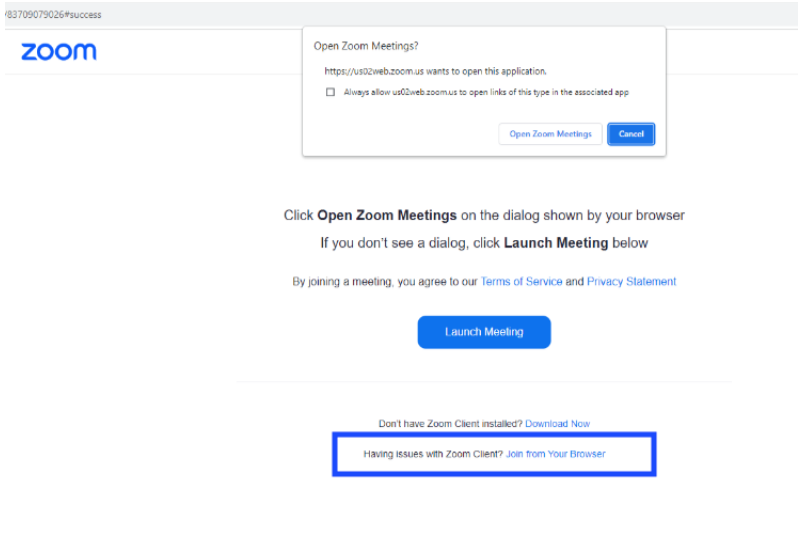
- When you click on the zoom link we shared with you, you will be taken to a page that looks like the one below.
- At the bottom of the page, there is an option to ‘Join from your browser.’
Want to learn more about the experience of being in a PeerSphere community?

Want to learn more about the experience of being in a PeerSphere community?

Get inspired, get connected, and get ahead with us!
© Peer Sphere 2025. All Rights Reserved.
© Peer Sphere. All Rights Reserved 2023
© Peer Sphere. All Rights Reserved 2023
